

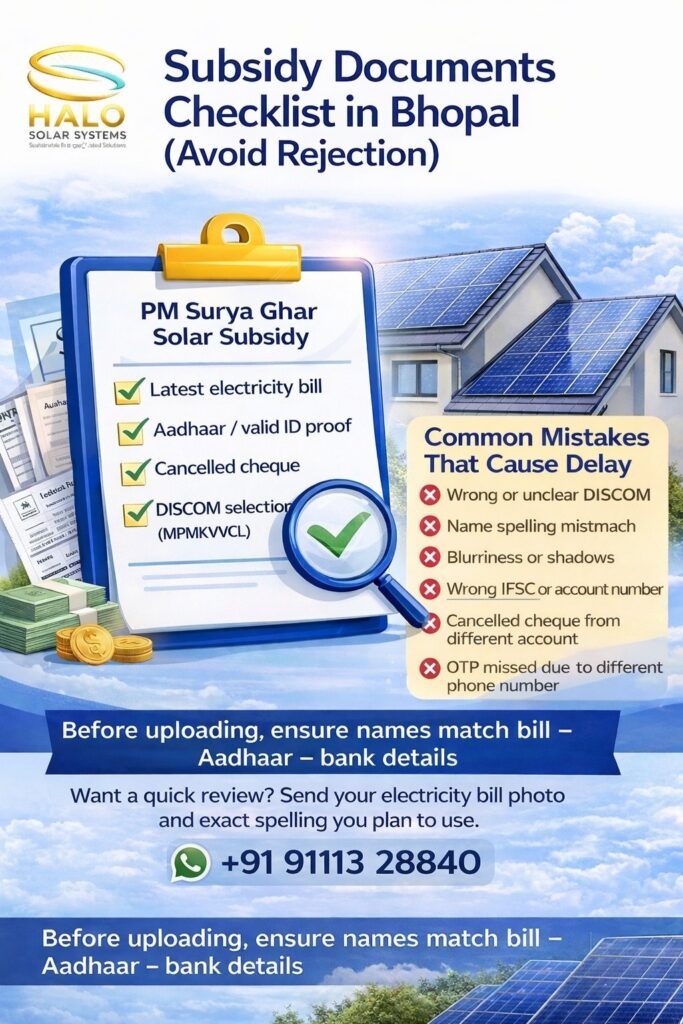
PM Surya Ghar subsidy becomes “easy” only when your documents are clean, clear, and consistent. In most Bhopal cases, delays happen for a simple reason: the name on the electricity bill doesn’t match the bank or ID, or the uploads are unclear (blur/cut corners). A small mismatch can trigger re-submission, and that can push your timeline back.
Also remember: the process is portal-based and stage-based—bank details + cancelled cheque are submitted through the portal for subsidy credit after commissioning. (Press Information Bureau)
Keep these ready (before you even start the portal form)
Points:
- Latest electricity bill (consumer/account number must be clearly visible)
- Aadhaar / valid ID proof (same spelling format as the bill name)
- Bank details + cancelled cheque (same applicant name; used for subsidy credit) (Press Information Bureau)
- Property/roof ownership proof (keep it ready if asked by vendor/DISCOM or during verification) (Sunboost Energy)
- Your own mobile number + email (use your number—not a relative’s—because OTP/updates come on this) (India Brand Equity Foundation)
Why this matters: The portal workflow requires registration using consumer number + mobile/email, and later you submit bank details + cancelled cheque for subsidy disbursal. (Press Information Bureau)
Bhopal-specific note (DISCOM selection)
Bhopal falls under Madhya Pradesh Madhya Kshetra Vidyut Vitaran Company Limited (MPMKVVCL) for electricity distribution in the Bhopal region. (Energy Department of Madhya Pradesh)
So while registering, ensure you select the correct State and DISCOM (many people select the wrong one and then the application gets stuck).
Before you upload (2-minute check that saves days later)
Points:
- Name on bill = name on Aadhaar = name on bank (same spelling, same order, same initials)
- Consumer number typed correctly (no missing digits)
- Correct DISCOM for Bhopal selected (MPMKVVCL) (Energy Department of Madhya Pradesh)
- Cancelled cheque is clear and readable (account number + IFSC visible)
- Documents are not blurred (no shadows, no cut edges, no glare)
If the name differs even slightly (example: “Amit Kumar” vs “Amit Kr.”), fix it first—either update bank name or electricity consumer name—so your file doesn’t bounce back later.
Upload quality checklist (most ignored, most painful later)
Points:
- Use a bright room light or daylight (avoid yellow/dim lighting)
- Keep the page flat (don’t hold it in hand while clicking)
- Ensure all 4 corners are visible
- Avoid WhatsApp-forwarded images (they compress quality)
- Prefer PDF or clear JPG as allowed by the portal/app workflow
A clean file gets processed faster because it reduces back-and-forth for verification.
Bank details: what to be careful about
The subsidy is credited to your bank account after commissioning and submission of bank details + cancelled cheque through the portal. (Press Information Bureau)
Points:
- Account holder name must match the electricity consumer name (best practice)
- IFSC must be correct (one wrong character can fail payment)
- Cancelled cheque should be from the same account you enter online
- If you use a joint account, ensure the primary name still matches (or ask your installer what works best for your case)
Common rejection / delay reasons in Bhopal (real-life patterns)
Points:
- Wrong DISCOM chosen during registration (application goes to the wrong office) (Energy Department of Madhya Pradesh)
- Bill is old or consumer number not readable
- Aadhaar name formatting mismatch with bill/bank
- Cancelled cheque unclear or belongs to a different account than entered
- Mobile number not active / OTP missed (using someone else’s phone) (Press Information Bureau)
- Blurry uploads, cut corners, or glare hiding key text
Simple “Ready-to-Upload” mini checklist (copy-paste)
Points:
- Electricity bill: ✅ clear consumer number + name
- Aadhaar/ID: ✅ same spelling as bill
- Bank/cancelled cheque: ✅ same name + readable IFSC/account no. (Press Information Bureau)
- Mobile/email: ✅ yours + active
- DISCOM: ✅ MPMKVVCL (Bhopal region) (Energy Department of Madhya Pradesh)
- Images: ✅ no blur, no crop, no compression
Important Notes:
One small mismatch can trigger resubmission. Fix spelling and formatting first (bill–Aadhaar–bank alignment). It saves days later and helps you reach the stage where bank details + cancelled cheque are accepted smoothly for subsidy credit after commissioning. (Press Information Bureau)
Want a quick document review?
Share your electricity bill photo and the exact name spelling you plan to use. Our team at Halo Solar Systems will guide you on what to correct before uploading—so you avoid rejection and unnecessary delays.
☀️ Halo Solar Systems
📍 Address:
Block 2, Chetak Complex, Zone 2, MP Nagar, Bhopal, Madhya Pradesh – 462011
📞 Phone:
+91 91113 28840
🌐 Website:
https://halosolarsystems.in
📍 Google Maps:
https://maps.app.goo.gl/w9CsAgw3hCZXUG829
🏡 Service Areas Across Bhopal
We proudly serve residential and commercial customers in:
Lalghati • Airport Road • Ayodhya Bypass • Karond • Nehru Nagar • Kotra • Neelbaad • Ratibad • Awadhpuri • Katara Hills • Baghmugalia • MP Nagar (Maharana Pratap Nagar) • Arera Colony • Habibganj • Shivaji Nagar • Char Imli • Shahpura • Kolar Road • Hoshangabad Road • TT Nagar